
Step-by-step process guidance
Compatible with PCB plotters and ProtoLasers
Prepares data for immediate production
Integrated PCB software workflow
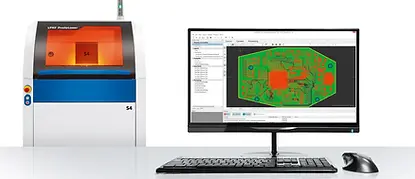
Tracks Laser & Electronics Ltd uses LPKF CircuitPro software to manage the full PCB prototyping process from CAD data import through to production. The software converts design files into structured manufacturing steps and guides you through each stage in sequence. During setup, it automatically detects connected prototyping systems and configures the workflow based on layers, materials, and finishing requirements, ensuring a controlled and consistent preparation process for each PCB project.

Design Rule Check
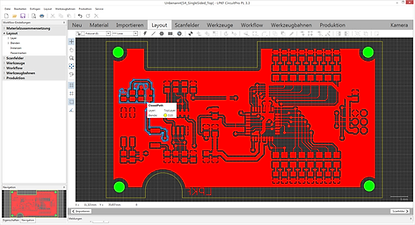
The LPKF software incorporates advanced algorithms to generate precise mechanical milling or laser paths for design processing. A dedicated design rule check function verifies that all spacing and layout parameters can be accurately handled by the available tooling, helping to catch potential issues before production begins.
Insulating the conductive traces
Once the design has been validated, LPKF CircuitPro generates the milling lines required to insulate the conductive traces. At the same stage, the software produces the contours needed for depaneling the finished board, with both operations configured directly through the technology dialog box.

The production wizard
From this point, the production wizard takes over and guides the user step by step through the remainder of the process. After switching from CAM to machine view, CircuitPro prompts the user to input material properties and define the position on the working surface. The project is then displayed on the virtual working surface, ready for production to begin. Multiple PCBs from the same project can also be arranged on a single panel at this stage, provided they share the same base material.
Messaging
Throughout the production run, the wizard monitors progress and alerts the user whenever manual intervention is required. This includes prompts for actions such as flipping the board, carrying out through-hole plating, or swapping a tool. Once production is complete, saving the project retains all production data, making it immediately available for future runs without the need to reconfigure.


Optimum performance
The latest version of the software features enhanced detection of geometric structures, allowing the system to process designs more efficiently. As a result, both ProtoMat and ProtoLaser systems benefit from a significantly accelerated workflow, improving overall throughput and consistency across mechanical and laser-based production tasks.
Software with intuitive operation for faster PCB development
Call us today for PCB software operation support.
